You type something into ChatGPT, hit enter, and get back a response so generic it could have come from a fortune cookie. Sound familiar?
The problem is almost never the AI. It’s the prompt. Most people treat AI like a search engine — toss in a few words and hope for the best. But generative AI prompts work completely differently. The clearer, more specific, and more structured your instruction, the more precise and useful the output.
A weak prompt wastes your time. A strong one feels like having a brilliant assistant who actually gets what you need. This guide gives you 70+ ready-to-use AI prompt examples across writing, coding, social media, image generation, business, and research — organized by use case so you can find exactly what you need in seconds. We’ve also included a section on the most common prompting mistakes and how to fix them, because knowing what not to do matters just as much.
Whether you’re using ChatGPT prompts, Claude, or Gemini, these examples are built to work. Copy them, adapt them, and start getting better results today.
1. What Makes a Good AI Prompt? The 4-Part Formula
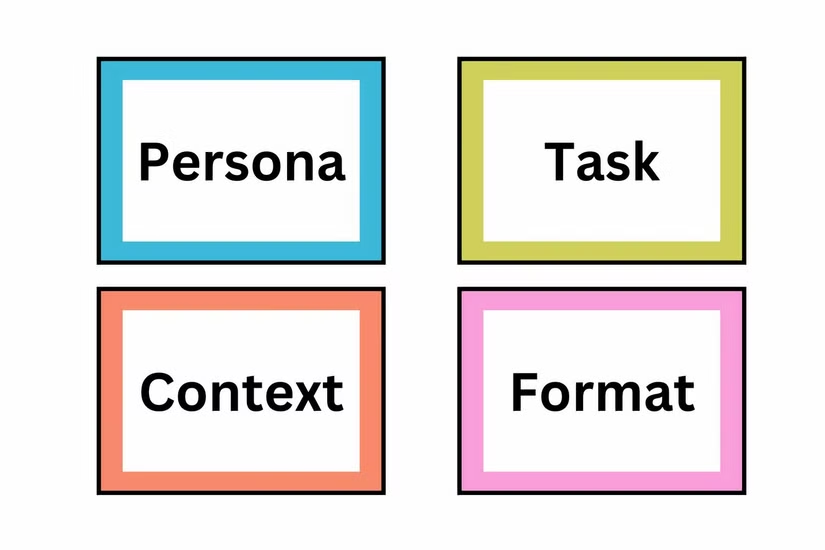
Before we jump into examples, let’s quickly cover what separates a prompt that works from one that doesn’t. You don’t need to memorize a complicated system — just remember four ingredients: Role, Context, Task, and Format (RCTF).
- Role — Tell the AI who it should be. (“Act as a senior marketing copywriter…”)
- Context — Give it background. (“…writing for a Pakistani e-commerce startup targeting women aged 25–40…”)
- Task — State exactly what you want. (“…write a 200-word product description for a linen kurta…”)
- Format — Specify the output structure. (“…in a warm, conversational tone with a clear call to action at the end.”)
Put those four together and you have an effective AI prompt. Leave one out and the output starts drifting.
Bad Prompt vs Good Prompt — Side-by-Side Examples
| Task | Bad Prompt | Good Prompt |
| Blog intro | “Write about AI tools” | Act as a tech blogger. Write a 120-word intro for an article about AI productivity tools for freelancers. Tone: conversational. Start with a surprising statistic |
| “Write a follow-up email” | Write a polite follow-up email to a client who hasn’t responded in 5 days. Context: we sent a fabric sample for approval. Tone: professional but warm. Max 100 words.” | |
| Code | “Write a Python script” | Write a Python function that reads a CSV file, removes duplicate rows, and exports a cleaned version. Include comments explaining each step.” |
Notice what changed? Each good prompt has a role, context, a specific task, and a defined format. That structure is what produces results you can actually use.
How Prompt Length Affects Output Quality
Longer isn’t always better — but detail always is. A 20-word prompt with the right specifics beats a 100-word prompt full of vague instructions. The sweet spot for most tasks is 40–80 words: enough to give the model context and constraints, not so much that you’re overwhelming it with noise. For complex tasks like prompt chaining or multi-step analysis, longer system-style prompts genuinely help. For quick rewrites or translations, keep it short and precise.
2. AI Prompt Examples for Writing and Content Creation
Writing is where most people start with AI — and for good reason. These content writing AI prompts cover blog posts, emails, copywriting, product descriptions, and matching your own voice. Whether you’re a freelancer, a marketer, or a business owner in Sialkot producing content for a global audience, there’s something here for you.
Blog Post and Article Writing AI Prompt Examples
Prompt 1 — Full article brief:
Act as an experienced content writer. Write a 1,500-word blog post titled '[Your Title Here]' for an audience of [describe audience]. Use a conversational tone, short paragraphs, and include one real-world example per section. Structure: intro, 5 subheadings, and a conclusion with a CTA.
Prompt 2 — Intro paragraph only:
Write a 120-word intro for a blog post about [topic]. Open with a surprising stat or a relatable frustration. Target reader: [describe]. Do not start with 'In this article.' Tone: direct and warm.
Prompt 3 — Outline generator:
Create a detailed article outline for the keyword '[target keyword]'. Include an H1, 6 H2 subheadings, 3 H3s per section, and a FAQ block with 5 questions. Note which sections should include examples or data.
Prompt 4 — SEO-optimized blog post:
Write a 2,000-word SEO blog post targeting the keyword '[keyword]'. Naturally use these secondary keywords: [list them]. Keep sentences under 20 words on average. Use the Flesch score of 60–70 as a readability target.
3. Email Writing AI Prompt Examples — Cold Outreach, Follow-ups, and Newsletters
Prompt 5 — Cold outreach:
Write a cold email to a [job title] at [company type] introducing our [product/service]. Keep it under 120 words. Open with a specific pain point, briefly state the solution, and close with a low-commitment CTA like 'worth a 15-minute call?'
Prompt 6 — Follow-up email:
Write a follow-up email for a situation where I sent a proposal 7 days ago and haven't heard back. Tone: polite, not pushy. Mention we're happy to answer any questions. Under 80 words.
Prompt 7 — Newsletter intro:
Write a newsletter opening paragraph for this week's edition about [topic]. Tone: friendly and curious, like you're writing to a colleague. Include a hook question that makes the reader want to keep reading.
4. AI Prompt Examples for Matching Your Own Writing Voice
One of the most powerful things generative AI can do is learn your tone — if you ask it correctly. These prompts for matching your writing voice are consistently among the most useful for content creators.
Prompt 8 — Voice match:
Here are three samples of my writing: [paste sample 1] / [paste sample 2] / [paste sample 3]. Analyze the tone, sentence length, vocabulary level, and personality. Then write a 300-word blog intro about [topic] that sounds like me, not like a robot.
Prompt 9 — Style replication:
Rewrite this paragraph in my established voice. My writing style is: short punchy sentences, occasional humor, zero corporate speak, and I almost always open sections with a question. Here's the paragraph: [paste text].
Copywriting and Product Description AI Prompt Examples
Prompt 10 — Product description:
Write a 150-word product description for [product name]. Target customer: [describe]. Highlight three key features as benefits, not specs. End with a one-line CTA. Tone: confident and aspirational.
Prompt 11 — Ad copy:
Write three versions of Facebook ad copy for [product]. Each version should be under 90 words. Version A: pain-point-led. Version B: benefit-led. Version C: social proof-led. Include a headline and body for each.
Prompt 12 — Landing page headline:
Write 10 headline options for a landing page selling [product/service] to [audience]. Mix emotional hooks, curiosity gaps, and direct benefit statements. Keep each under 10 words.
5. AI Prompt Examples for Coding and Development
These code generation prompts are built for developers, data analysts, and technical professionals who want AI to help write, debug, test, and document code — not just produce toy examples that fall apart in production.
Prompts to Generate Clean, Production-Ready Code
Prompt 13 — Function generation:
Act as a senior Python developer. Write a function that [describe task]. Use clean variable names, follow PEP 8 style, add docstrings, and include inline comments for any non-obvious logic. Return the full function with a usage example.
Prompt 14 — API integration:
Write Python code to make a GET request to [API endpoint] with these headers: [list headers]. Parse the JSON response and extract [specific fields]. Handle errors gracefully with try/except blocks.
Debugging and Error-Fixing AI Prompt Examples
Prompt 15 — Bug fix:
Here is my code: [paste code]. It's throwing this error: [paste error message]. Explain what's causing it, then give me the corrected version with comments showing what you changed and why.
Prompt 16 — Code review:
Review this code for: (1) bugs, (2) performance issues, (3) security vulnerabilities, and (4) readability. Give your feedback as a numbered list. Here's the code: [paste code].
AI Prompt Examples for Writing Unit Tests and Documentation
Prompt 17 — Unit tests:
Write unit tests for this Python function using pytest: [paste function]. Cover: happy path, edge cases, and at least two failure scenarios. Add a comment explaining what each test validates.
Prompt 18 — README documentation:
Write a README.md for this project: [briefly describe project]. Include: project overview, installation steps, usage examples, environment variables needed, and a contributing section. Use clear headings and code blocks.
6. SQL and Data Query AI Prompt Examples
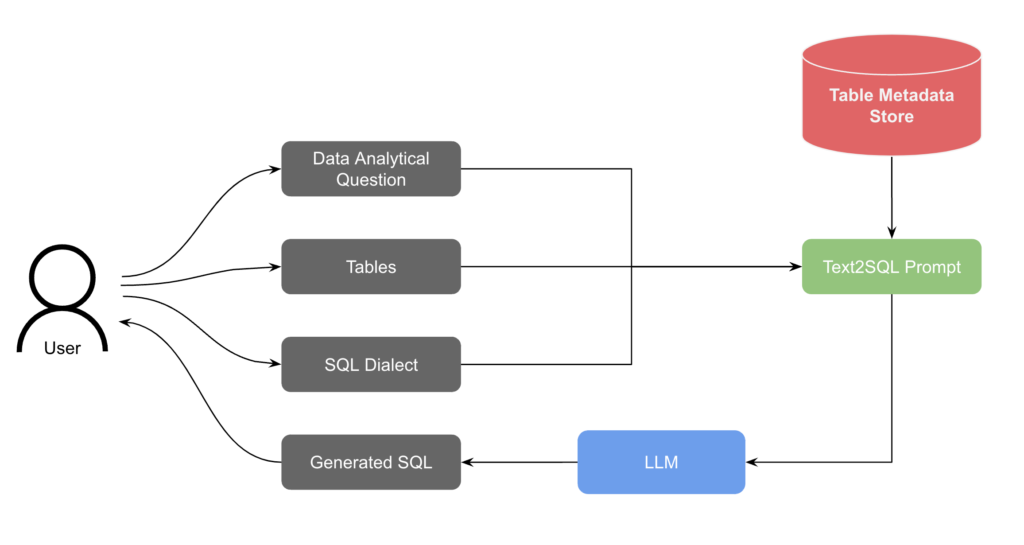
Prompt 19 — SQL query:
Write a SQL query that [describe what it should do — e.g., 'joins the orders and customers tables, filters for orders placed in the last 30 days, and groups results by region with total revenue per region']. Use standard SQL syntax compatible with PostgreSQL.
Prompt 20 — Data analysis:
Act as a data analyst. I have a CSV with these columns: [list columns]. Write a pandas script that cleans the data (remove nulls, fix data types), calculates [specific metric], and outputs a summary table.
7. AI Prompt Examples for Social Media and Marketing
High commercial intent lives here. These social media AI prompts cover Instagram, LinkedIn, Twitter, ad copy, content calendars, and brand voice — the areas where ChatGPT prompts for marketing teams save the most time.
Instagram, LinkedIn, and Twitter Post AI Prompt Examples
Prompt 21 — Instagram caption:
Write an Instagram caption for a photo of [describe image/product]. Brand tone: [e.g., warm and empowering]. Include 3–4 relevant hashtags at the end and a soft CTA. Max 150 characters for the first line (visible before 'more').
Prompt 22 — LinkedIn post:
Write a LinkedIn post sharing a professional lesson I learned from [experience]. Tone: thoughtful and honest, not braggy. Structure: hook line → 3–4 short paragraphs → closing question to spark comments. No bullet points. Max 250 words.
Prompt 23 — Twitter/X thread:
Write a 7-tweet thread about [topic]. Tweet 1: a bold hook. Tweets 2–6: one insight each with a real example. Tweet 7: summary + CTA to follow for more. Keep each tweet under 260 characters.
AI Prompt Examples for Writing Ad Copy and Call-to-Action Text
Prompt 24 — Google ad copy:
Write Google Search ad copy for [product/service]. Provide: 5 headline options (max 30 characters each), 2 description lines (max 90 characters each). Focus on [main benefit]. Target keyword: [keyword].
Prompt 25 — CTA variations:
Write 10 call-to-action button texts for a [type of page — e.g., SaaS free trial signup]. Mix urgency, benefit, and curiosity-based options. Keep each under 5 words.
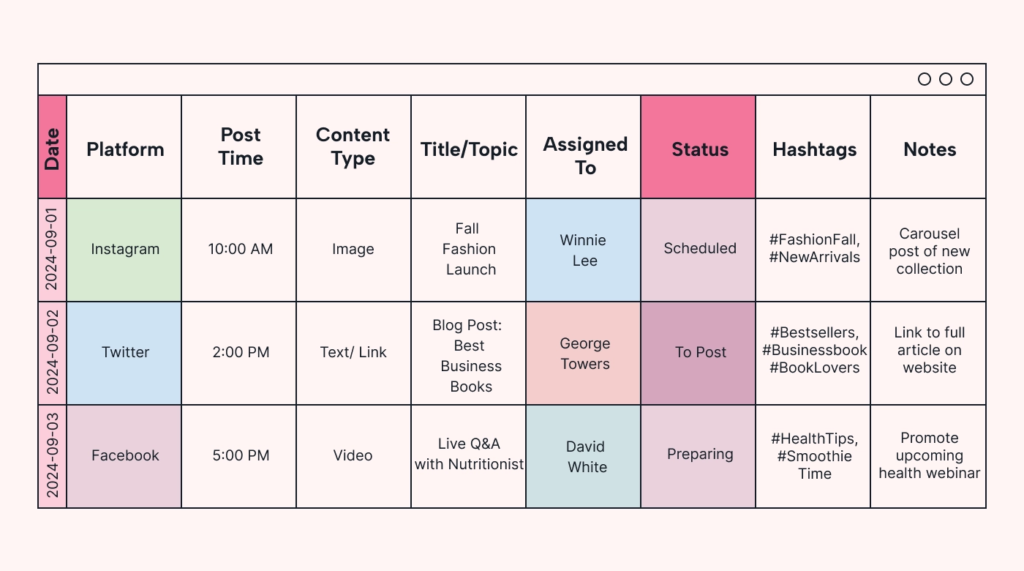
AI Prompt Examples for Building a Monthly Content Calendar
Prompt 26 — 30-day content calendar:
Create a 30-day social media content calendar for a [type of business] targeting [audience]. Platform: [Instagram/LinkedIn/etc.]. Include: post topic, content type (reel, carousel, static), best time to post, and the primary goal (engagement, traffic, or sales) for each post.
Prompt 27 — Weekly content themes:
Suggest 4 weekly content themes for a [business type] brand on Instagram. Each theme should have 3 post ideas. Align with the brand values: [list 2–3 values].
AI Prompt Examples for Defining and Maintaining Brand Voice
Prompt 28 — Brand voice document:
Create a brand voice guide for [company name], a [describe company]. Include: tone adjectives (with examples of what it is vs. what it isn't), vocabulary to use and avoid, sample do's and don'ts for social media, and a one-paragraph brand voice statement.
Prompt 29 — Tone-consistent rewrite:
Rewrite this marketing copy in our brand voice. Our tone is: [describe]. Avoid: [things to avoid]. Here's the original: [paste text]
8. AI Prompt Examples for Image Generation
This is the section none of the major competitors cover neutrally — most guides either skip image prompts entirely or only promote their own tool. These AI image prompts work across Midjourney, DALL-E, and Stable Diffusion, and cover the variables that most beginners miss entirely.
How Image Prompts Differ from Text Prompts
Image generation prompts operate on a different logic than text prompts. Where text prompts benefit from instructions and context, image prompts are built on descriptive stacking — layering subject, style, lighting, medium, color palette, and composition into one flowing description. Verbs and abstract ideas confuse image models; nouns and adjectives guide them.
The basic structure: [Subject] + [Style] + [Medium] + [Lighting] + [Color palette] + [Composition/Framing]
Midjourney and DALL-E Prompt Examples
Prompt 30 — Photorealistic portrait:
A young South Asian woman in her 30s sitting by a window, natural morning light, film photography style, shallow depth of field, muted warm tones, Kodak Portra 400 aesthetic, documentary portrait.
Prompt 31 — Product mockup:
A minimalist flat lay of a white linen kurta on a light beige textured surface, surrounded by dried botanicals, overhead shot, soft natural light, editorial fashion photography, high resolution
Prompt 32 — 3D illustration:
A 3D render of a futuristic AI robot assistant sitting at a desk, Pixar-style, soft studio lighting, teal and ivory color palette, clean background, high detail, isometric perspective
Prompt 33 — Watercolor art:
A traditional Pakistani old city street with chai stalls and rickshaws, loose watercolor illustration style, warm saffron and terracotta palette, nostalgic mood, textured paper background
Using Negative Prompts to Remove Unwanted Elements
Negative prompts tell the model what not to include — and they’re one of the most underused techniques for better AI image results.
Prompt 34 — Negative prompt example (Stable Diffusion):
Portrait of a confident businesswoman, professional headshot, clean studio background, soft lighting" Negative: "blurry, distorted hands, extra fingers, low resolution, cartoonish, oversaturated, watermark, text
Prompt 35 — Style exclusion:
Positive: "A cozy coffee shop interior, warm lighting, wooden furniture, morning atmosphere" Negative: "people, neon signs, cluttered, dark, horror aesthetic, anime style"
Prompt Examples for Consistent AI Portraits and Branding Visuals
Prompt 36 — Brand visual consistency:
A flat vector illustration of [subject] in a consistent style: clean lines, limited color palette of [your brand colors], white background, minimal detail, scalable icon style — suitable for a website homepage
9. AI Prompt Examples for Business and Productivity
This cluster has surprisingly little dedicated coverage from the top-ranking pages. These ChatGPT prompts for work address the real daily tasks that professionals — from operations managers to small business owners — actually need help with.
Prompts for Writing Reports, Proposals, and Meeting Summaries
Prompt 37 — Business report section:
Act as a business analyst. Write a 300-word executive summary for a report on [topic]. Include: key findings (3), main recommendation, and next steps. Tone: formal but accessible. Audience: senior management.
Prompt 38 — Project proposal:
Write a one-page business proposal for [project idea]. Include: problem statement, proposed solution, expected outcomes, timeline (3 phases), and estimated budget range. Tone: professional and persuasive
Sales and Customer Service Prompt Examples
Prompt 40 — Sales email sequence:
Write a 3-email sales sequence for [product/service]. Email 1: awareness (problem-focused). Email 2: consideration (solution + social proof). Email 3: decision (offer + urgency). Keep each under 150 words. CTA in every email.
Prompt 41 — Customer complaint response:
Write a professional response to a customer complaint about [issue]. Tone: empathetic, not defensive. Structure: acknowledge the issue → apologize → explain what happened briefly → state resolution → invite further contact. Under 120 words.
AI Prompts for HR, Recruitment, and Job Descriptions
Prompt 42 — Job description:
Write a job description for a [job title] at a [company type]. Include: role overview (2–3 sentences), 5 key responsibilities, 4 required qualifications, 3 preferred skills, and a short company culture note. Avoid corporate jargon.
Prompt 43 — Interview questions:
Generate 10 interview questions for a [job title] position. Mix: 3 situational questions, 3 behavioral questions, 2 technical questions, and 2 culture-fit questions. Include what a strong answer would demonstrate for each.
Prompts for Strategic Planning — SWOT, Competitor Analysis, Market Research
Prompt 44 — SWOT analysis:
Conduct a SWOT analysis for a [type of business] in [industry/market]. Based on common market dynamics, list 3 items per quadrant (Strengths, Weaknesses, Opportunities, Threats). Present as a 2x2 table with one-sentence explanations.
Prompt 45 — Competitor analysis:
Act as a market research analyst. Compare [Company A] and [Company B] across: pricing, target audience, key features, marketing approach, and main differentiator. Format as a comparison table.
10. AI Prompt Examples for Research and Analysis
These brainstorming AI prompts and research synthesis prompts are ideal for professionals who use AI as a thinking partner — not just a writer. Analysts, academics, consultants, and strategists will find these especially useful.
Prompt 46 — Document summary:
Summarize this document in 200 words. Preserve the key arguments, main data points, and conclusion. Do not include your own opinion. Here's the text: [paste document]
Prompt 47 — Comparative research:
Compare [Topic A] and [Topic B] across these dimensions: [list 4–5 dimensions]. Present as a structured table. Cite where the main points of difference matter most for [your specific context].
Prompt 48 — Trend analysis:
Identify 5 emerging trends in [industry] relevant to [your role/business]. For each trend: describe it in 2 sentences, explain why it matters now, and suggest one practical action a business could take.
Prompt 49 — Literature or source review:
I'm researching [topic]. Here are 3 sources I've read: [paste summaries or key points]. Synthesize the common themes, note any contradictions between them, and suggest 2–3 follow-up questions I should explore.
Prompt 50 — Brainstorming session:
Act as a creative strategist. Give me 15 content ideas for [platform] targeting [audience] about [topic]. For each idea, include: the angle (emotional/educational/entertainment), suggested format, and one hook line.
11. AI Prompt Examples by Platform — ChatGPT, Claude, and Gemini
Here’s what most guides skip entirely: the same prompt doesn’t always produce the same result across different models. These aren’t flaws — they’re design differences worth understanding and using to your advantage.
ChatGPT (GPT-4o) performs best at structured, multi-step tasks, creative writing with personality, and generating multiple output variations in one shot. It handles ambiguity well and often adds useful context you didn’t ask for.
Claude handles nuanced, long-form content exceptionally well. It’s especially strong at maintaining a consistent tone, following detailed stylistic instructions, and avoiding the “AI-sounding” patterns that make content feel synthetic. It tends to be more literal with instructions — which is great for professional and formal writing.
Gemini integrates real-time web search and shines at research-based tasks, fact-checking, and questions that require current information. Its strength is in grounding responses in up-to-date data, making it ideal for market research or trend analysis prompts.
Prompt 51 — Adapting a prompt for each model:
For a brand voice guide task, adjust like this:
- ChatGPT: “Create a brand voice guide for [brand]. Give me 3 variations — casual, professional, and bold. Include examples of on-brand vs off-brand copy for each.”
- Claude: “Create a detailed brand voice guide for [brand]. Follow these instructions precisely: [detailed instructions]. Prioritize consistency and avoid generic marketing language.”
- Gemini: “Research the top 3 competitors of [brand] and create a brand voice guide that differentiates [brand] from each. Use current market positioning.”
12. 5 Prompt Mistakes to Avoid (and How to Fix Them)
Even experienced users make these. Knowing why your AI prompts are not working is half the fix.
Mistake 1 — Being too vague Vague prompt: “Write something about marketing.” Fixed: “Write a 300-word LinkedIn post for a B2B marketing consultant sharing one counterintuitive lesson about email open rates. Tone: direct and confident.”
Mistake 2 — Overloading a single prompt with too many tasks Cramming five different asks into one prompt confuses the model and produces a bloated, unfocused response. Break complex requests into a chain: first ask for an outline, confirm it, then ask for the full piece section by section.
Mistake 3 — Not specifying tone, audience, or format “Write a blog post” gives the AI almost nothing to work with. Always answer these three questions in your prompt: Who is reading this? What tone should it strike? What structure should it follow?
Mistake 4 — Forgetting to iterate The first output is a first draft, not a final answer. The best results come from treating AI prompting as a conversation: review the output, tell it what to keep, what to cut, what to adjust, and ask for a revised version. One attempt is rarely enough — and that’s normal.
Mistake 5 — Using AI as a search engine Typing “best marketing strategies 2025” into ChatGPT gives you a generic list. Asking “Act as a marketing strategist. I run a mid-sized apparel business in Pakistan targeting export buyers. Give me 5 marketing strategies specifically suited to my context, with one practical first step for each” gives you something you can actually use.
Frequently Asked Questions
What is an AI prompt example?
An AI prompt example is a ready-made instruction you can give to an AI model like ChatGPT or Claude to generate a specific type of output — a blog post, a piece of code, an image, or a business document. Examples show you the structure, tone, and detail level that produces good results, rather than making you figure it out from scratch.
How do I write a good AI prompt?
Use the RCTF formula: Role (tell the AI who it is), Context (give background), Task (state exactly what you want), and Format (define the output structure). Add specifics — audience, tone, word count, and examples — wherever relevant.
What is the best prompt format for ChatGPT
For most tasks, a role-based prompt with context and format constraints works best: “Act as a [role]. [Context]. Write a [format + length] about [task]. Tone: [tone]. Include: [specific elements].” Adjust the level of detail based on how complex the task is.
Can I use the same prompts for Claude and ChatGPT
Mostly yes, but with small adjustments. Claude tends to follow detailed stylistic instructions more precisely, so adding more specific formatting rules pays off. ChatGPT is more flexible with ambiguity and often adds helpful context unprompted. Test both and keep the version that works better for your specific use case.
Why does my AI prompt keep giving generic answers?
Usually because the prompt lacks specificity. The more general your instruction, the more general the output. Add your audience, your context, constraints, and examples of what “good” looks like. If you’re still getting generic results, try adding: “Do not use clichés or generic AI phrases. Write as if for a real human audience who will immediately notice lazy writing.
Are there ready-made AI prompt templates I can use?
Yes — every prompt in this guide is a template. Replace the parts in brackets [ ] with your specific details. For recurring tasks, save your best-performing prompts in a notes app or doc so you’re not rewriting them every time.
Conclusion: Your Next Step — Pick a Prompt and Start Today
The gap between AI users who get remarkable results and those who don’t isn’t intelligence or access. It’s the quality of their prompts.
You now have 50+ AI prompt examples across every major use case — writing, coding, social media, image generation, business, and research. You have a formula, a list of mistakes to avoid, and platform-specific guidance. Everything here is designed to be practical, not theoretical.
The best move you can make right now is to pick one section — the one most relevant to your work today — copy one prompt, adapt it to your context, and run it. See what comes back. Iterate once. Notice the difference.
Bookmark this page. The prompts aren’t going anywhere, and as you get more comfortable, you’ll find yourself coming back to remix and build on them. That’s how good prompt writers develop — not in one sitting, but one well-crafted instruction at a time.
More Image prompts click on the button bellow